Computer Cables and Adapters – Reliable Connection in Every Situation
In this category, you will find various computer adapters and converter cables that allow you to easily connect both older and newer devices. Whether it's connecting a monitor, television, projector, or other multimedia devices, with the right connector, you can achieve a stable, high-quality image and sound.
Our selection includes DVI, HDMI, VGA, DisplayPort, USB-C, MHL, and composite (Cinch/RCA) adapters, so you will find a solution even if your computer and display have different connectors. The compact adapters and converters are ideal for home, office, and presentation use alike.
- HDMI–VGA, HDMI–DVI, and VGA–HDMI converter adapters for monitors and projectors
- Cinch/RCA – HDMI and DVI – Cinch composite video converters for older TVs and players
- Mini DisplayPort – HDMI / VGA adapters for notebooks and ultrabooks
- USB-C – VGA cables for connecting modern laptops to older displays
- MHL – HDMI converters for connecting smartphones to TVs
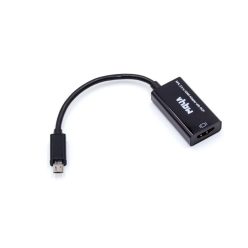
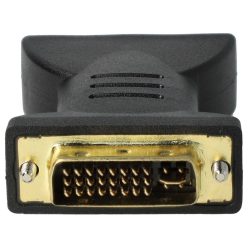
What type of computer adapter are you looking for?
The compatibility between computers and external displays, TVs, or projectors is influenced by various connector types today. A common situation is that a desktop PC or notebook has an HDMI output, while the monitor only has a VGA or DVI input – this is where HDMI–VGA, HDMI–DVI, or VGA–HDMI converters come into play. With these, you can easily connect your existing display to the new machine without any additional devices.
Another typical task is connecting old analog devices – such as a DVD player, camcorder, or game console – to a modern HDMI television. For this, composite (Cinch/RCA) – HDMI and DVI – Cinch video converters provide a solution, converting analog signals to digital. If you want to mirror your smartphone to a larger screen, MHL–HDMI adapters help with watching movies, presentations, or displaying photos.
Important Technical Considerations When Choosing
The first step in selecting the ideal adapter is identifying the connectors of the source (computer, laptop, phone) and the target device (monitor, TV, projector). After that, it's worth considering the desired resolution and image quality: some converters only support signals up to Full HD, while others can handle higher resolutions, such as 2K or 4K. It may also be important to determine whether audio transmission is needed, or if only the video needs to be transmitted.
- Connector Type: HDMI, VGA, DVI, DisplayPort, Mini DisplayPort, USB-C, MHL, Cinch/RCA
- Direction: for example, HDMI → VGA is not the same as VGA → HDMI; an active converter may be needed
- Resolution and Refresh Rate: supported maximum resolution (e.g., 1920×1080, 2560×1440)
- Power Supply: some converters require a separate power supply via mini USB cable for stable operation
- Cable Length: built-in cable length or the option to connect a separate HDMI/VGA cable
Connecting Modern and Older Devices
Mini DisplayPort–HDMI / VGA adapters are particularly useful for business and premium notebooks, which often have such outputs. A USB-C–VGA cable may be needed if you want to use a new laptop with only USB-C video output with an older VGA monitor. VGA–HDMI converters are especially popular in office environments, where many older projectors are still in use while new computers are equipped only with digital display ports.
With all these solutions, you can extend the lifespan of your existing devices without having to purchase a new monitor or television immediately after a computer upgrade. By selecting the right adapter, you can create a stable, high-quality connection, whether for work, home entertainment, or presentations.